
 February 18, 2011
As I’m working in Coda all day and I’m usually working with WordPress code, I took a moment and parsed our WordPress docs and created a WordPress syntax file for Coda.
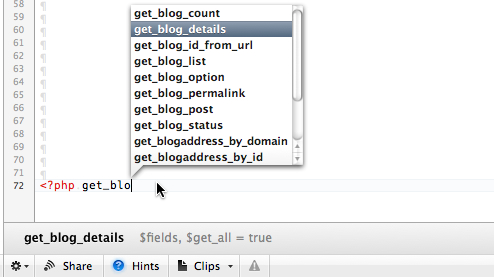
PHP-HTML-WP mode
The mode is based on the PHP-HTML mode that comes with Coda 1.7 and WordPress 3.3.
Requirements:
Tested on Coda 1.7, might work on previous versions.
Installation:
- Download the packed mode file and unpack it.
- Copy the
PHP-HTML-WP.modethe Coda Modes folder.~/Library/Application Support/Coda/Modes/ - Open a WordPress or PHP file and load the syntax mode in Coda by visiting Text -> Syntax Mode -> PHP-HTML-WP in the toolbar.
- Optional: To make this mode the default visit the Editor pane in the Preferences window and select the ‘PHP-HTML-WP’ mode as default file type
Please note that this is an early version and is most likely still buggy. If you encounter any issues don’t hesitate to leave us a note.


 A HitchHackers guide through WordPress
Thank you for this useful mode file, I’ve created a list of functions myself as Clips but this is much more comprehensive.
– James
Excellent. That’s very very helpful. Thanks
Thanks a bunch for this! Like James, I have a bunch of clips, but have been thinking about taking some time and doing just this. Thanks for saving me a bunch of time! Awesome!
I’m really happy that I’m not the only one who’s getting a use from this. In case you also like to add a book for your documentation lookup in Coda then also have a look at https://hitchhackerguide.com/documentation-api/
And of course – let me know if you run into any trouble.
Seder dill check out this as soon i get home! Sounds promising!
This is awesome, I’m going to try this out asap. One question, however, is how to change the colors.
I’m using a different color scheme for Coda which has a darker bg and pastel colors for the code. There’s no seestyle file for this code but I’d like to overwrite the default styling.
Is there an easy way to do this? Will I find something in the .mode folder? I tried adding a custom seestyle file and importing a new one but it didn’t work.
You could alter the colors in the SyntaxDefinition.xml directly
Is it difficult to link it to a seestyle file for easy editing? I did it manually myself and that worked great, thanks for the suggestion.
You could just use a PHP-HTML seefile and replace all instances of PHP-HTML with PHP-HTML-WP.
I already tried what you suggested before and it didn’t work. 😦 Oh well, I’ll live with what I have. Thanks again!
That’s odd. It worked for me. Of course you need to have a seestyle for the php-html mode.
worked for me too … find and replace though as its in more than one place in the seefile
Hi Thorsten
Thanks a lot. Great tool. Before I use clip but it’s not so useful than yours staff.
If I see bugs, I writte it down.
Very impressed! 🙂 Making coding quite a bit easier now. Would love to see support for the functions parameters eventually.
You can see the function parameters in the hints section where available.
Amazing work, thanks! 🙂
This is fantastic, thanks for taking the time to create something like this. It makes WP development a lot less strenuous!
Just in case there is someone out there like me who for some reason does not have the ‘Application Support/coda/” folder, just create it and you will be fine.
My 2 cents.
Amazing job with this. Will love to help.
Thanks a lot for this features. It’s very useful, this will save me lots of time! Tank you again
You beauty! This has made life so much easier than switching back and forth from WordPress Codex.
Thanks for the hard work folks!
Hey, I can’t find the Coda folder in ApplicationSupport folder. Can you help me?
The folder should be in ~/Library/Application\ Support/ – this might help.
~/Library/Application/Support/ I don’t have
~/Library/Application Support don’t have any folder called Coda 😦
Have you checked in /Library/Application Support?
Yes, and I bought my Coda today
I’m running out of ideas here, sorry.
I had the same issue – I just manually created the Coda/Modes folders and it’s working well!
I had the same issues, I just manually created the folders and it’s working well!
I solved my problem, just click and hold in finder, select “Go to folder” and type ~/Library/Application Support/ 😀
Somebody’s got to ask… Does this work with Coda 2? (I tried to install it but it doesn’t show up). Is an update coming soon?
I only checked with one of the Beta versions which was working iirc. I’ll see what I can do.
I am using Coda 2 and unable to figure out how to get the color coding working. Anyone have suggestions? Thanks!
it works, but code colors are missing. Any idea ?
I’m using Coda 2 and I can’t figure out how to get the color coding to work. Does anyone have a suggestion? Thanks!
For all of you with coloring issues in Coda 2. I’m working on a fix and should have it ready within the next week.
I just released a WordPress syntax mode for Coda 2 that includes all WordPress 3.6 functions: https://github.com/tillkruess/Coda-WordPress-Mode
Till, that’s extra awesome. Especially as I already moved away from Coda and won’t be getting back to maintaining this any time soon.
Daniel, thanks for the temporary fix. I’m trying to get this adjusted asap.
i tried this with CODA 2 and its working but the color doesnt show up !
Not putting any pressure but did you ever address this?
I’ll owe you a few beers anyway since on Coda 1.x it helped me a lot!
maxime: try this http://danielkoskinen.com/fix-wordpress-syntax-mode-for-coda-2/
Sadly not yet. I still have this on my todo for the 3.5 release though